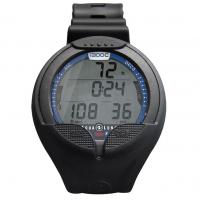
Graviton Color Watch Computer
주문 전에 사이즈, 구성 및 배송 시간을 확인해 드립니다.
WhatsApp으로 문의상품 설명
Experience Excellence with the Genesis Graviton: A Fusion of Centauri’s Best Features and a Vibrant Color Screen! This new Genesis diving computer and daily watch boasts a high-resolution MIP (Memory In Pixel) LCD color display, ensuring unparalleled clarity and brightness. Offering Scuba, Free Dive, and Nitrox modes, this full-featured dive watch simplifies navigation with its five intuitive buttons. The contrast-rich MIP color screen provides instant access to crucial information, allowing adjustable settings for an optimized diving experience. Powered by the Buhlmann ZHL-16C algorithm, similar to the Centauri, it includes a comprehensive database of Dive Sites worldwide. Upon activating Scuba or Free Dive Modes at a Dive Site, the GPS swiftly hunts for location coordinates, indicated by a flashing target symbol. Recognized Dive Sites display their names, while unrecognized sites reveal GPS coordinates.
DETAILS
- Scuba, Free Dive, and Watch Mode
- Nitrox support up to 99%
- Maximum operating depth: 100m/328ft
- Backlight screen
- Rechargeable battery
- Resettable settings
DIVE STORY APP NOW AVAILABLE
FOR ANDROID & iOS
The long awaited Dive Story App is now available for both iOS and Android mobile devices to download, record and manage all your Graviton Wrist Dive Computer diving adventures.
Dive Story App functions:
-
Download and record your dive logs on iOS and Android mobile devices.
Dive Story is not available for laptop or desktop computers. - Change Graviton dive computer settings.
- Upgrade Graviton dive computer firmware.
G-SENSOR
When in Scuba Mode or Free Dive Mode you can Twist (Flick) your wrist to activate the G-Sensor to change the lower part of the screen to view additional information.
In Scuba Mode
Standard Screen shows SI and MOD
With 1st Twist SI and MOD change to Compass Heading
With 2nd Twist Compass Heading changes to Tissue % Loading
With 3rd Twist Tissue % Loading goes back to Si and MOD
In Free Dive Mode
With 1st Twist Last Depth and Last Time change to Time of Day and Temp
With 2nd Twist Time of Day and Temp changes back to Last Depth and Last Time
You may also like
Reviews (0)
No reviews yet — be the first to share your experience.