Brand not specified
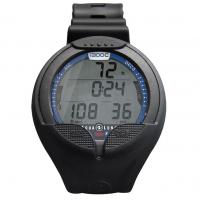
Donatello Wide Screen Computer Puun
฿10,500
공급처 재고 있음· SKU: KS860022
확인됨: 2026. 10. 10. AM 12:01:24 · Thailand
확인된 재고
현재 재고가 확인된 상품에만 가격이 표시됩니다.
배송
주문 전에 사이즈, 매장 수령 및 배송을 문의하세요.
상품 설명
For people who just want to dive.With its streamlined single-button navigation, heavy-duty case and scratch-resistant display, the Cressi Donatello dive computer is perfect for divers seeking straightforward functionality and durability.Designed with recreational and free divers in mind, the Donatello has four operating modes: Air, Nitrox, Gauge and Free.In dive mode, the computer acts as a complete diving data processor. Configure your PPO2 settings within a set range and benefit from the advanced Cressi RGBM Algorithm, enabling adaptive decompression calculations for safe ascent profiles during multi-day and repeat dives.The Donatello supports the management of a single gas mix during your dive, ideal for divers who want the benefit of Nitrox, but without the need for switching gases.Versatile enough for all water activities, the Donatello is a fantastic freediving computer. It automatically tracks surface intervals and the length of your diving session. Maximum depth and recovery time alarms will ensure you stay within safe parameters.The Donatello is also the ideal backup computer for technical divers, featuring a very strong backlight that allows you to see the screen’s data, even in low-visibility environments. With the option to disable alarms, it’s a great choice for snorkellers too.A user-changeable battery ensures quick replacements, so you’re always prepared for your next dive adventure.
You may also like

Reviews (0)
No reviews yet — be the first to share your experience.