Cressi
NEWTON TITANIUM COMPUTER
품절
품절· SKU: KS800050
주문 전에 사이즈, 구성 및 배송 시간을 확인해 드립니다.
WhatsApp으로 문의확인된 재고
현재 재고가 확인된 상품에만 가격이 표시됩니다.
배송
주문 전에 사이즈, 매장 수령 및 배송을 문의하세요.
상품 설명
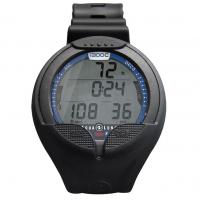
The Newton computer-watch by Cressi is a recreational advanced tool. It will provide all the necessary information in regards to depth, dive times, possible need of decompression, ascent rate and all the surface intervals between dives. Nitrogen absorption and release is continuously processed by its sophisticated software, taking into account the quantity of inert gas contained in the different mixtures that can be used. This information is shown on the device’s display due to the PCD (Priority Compartment Digit Display) system that allows an easy and direct “dialogue” between the diver and the computer, ensuring a clear understanding of all the data needed at any given time and a perfect readability in any situation. The computer is provided with clock, chronograph and calendar and a versatile dive memory (logbook). The mathematical model of Newton can make saturation and desaturation calculations of dives carried out both with air and with nitrox during any moment of the dive. In this last case, you can set all the parameters related to the mixture of our dive: from the maximum allowed PO2 value (between 1.2 bar and 1.6 bar), to the mixture’s oxygen percentage (FO2): between 21% and 99% of O2. Additionally, the device may be set by the user for either metric (m-ºC) or feet system (ft- ºF). The Newton dive computer-watch can be connected to a personal computer by means of the Cressi interface (accessory not included) and the related software (accessory not included).
You may also like

Reviews (0)
No reviews yet — be the first to share your experience.