Aqualung i200C Complete Replacement Strap
확인됨: 2026. 10. 9. AM 6:03:21 · Thailand
상품 설명
Aqualung i200C Complete Replacement Strap
Give your Aqualung i200C Dive Computer a fresh look with a genuine replacement strap, designed to restore the comfort, fit and original appearance of your dive computer.
Whether your existing strap is worn, damaged or you simply want to change its color, this complete replacement strap is the ideal solution to keep your Aqualung i200C looking great and ready for your next diving adventure.
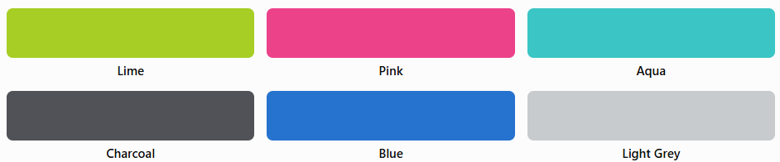
Available Colors
Choose from six original Aqualung i200C colors:
- Lime – Bright and highly visible
- Pink – Vibrant and distinctive
- Aqua – Fresh tropical blue-green
- Charcoal – Classic dark grey
- Blue – Sporty ocean-inspired blue
- Light Grey – Clean and understated
Product Features
- Designed specifically for the Aqualung i200C Dive Computer
- Complete replacement strap
- Comfortable and flexible wristband design
- Available in six original colors
- Ideal for replacing a worn or damaged strap
- Refreshes the appearance of your existing dive computer
Keep Your Aqualung i200C in Great Condition
A damaged or worn strap can compromise the secure fit of your dive computer. Replacing it with the correct strap helps keep your computer comfortably positioned on your wrist during diving and everyday use.
Restore your Aqualung i200C with a complete replacement strap from Aquamaster Thailand.
Compatibility: Aqualung i200C Dive Computer only. Please verify compatibility before ordering.
You may also like
Reviews (0)
No reviews yet — be the first to share your experience.