Brand not specified
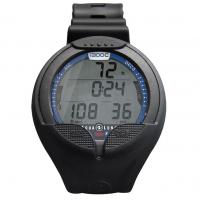
Neon Watch-style Computer Puun
฿14,250
Beim Lieferanten verfügbar· SKU: KS840020
Checked: 10.10.2026, 00:01:24 · Thailand
Verified availability
Prices shown only for currently verified stock.
Shipping
Ask about fit, pickup and delivery before ordering.
Description
For divers who seek simplicity without compromising on performance.Whether you’re a scuba diver, freediver or spearfisher, the Cressi Neon is a compact dive computer that’s smart enough to wear to the office.Monitoring your dive data is simple and intuitive; a clean, edge-to-edge display allows you to see your stats at a glance and you can switch between 4 different modes: Air, Nitrox, Gauge and Free.Providing real-time data, including dive phase time, ascent speed and a customisable PPO2 range, the Neon’s adaptable Cressi RGBM Algorithm supports multi-day decompression diving and Technical Features an adjustable deep stop and O2 toxicity monitoring for enhanced safety.You can manage 2 Nitrox gases during a dive and even switch between Air and Nitrox modes between dives, a feature that is often missing on other similarly priced dive computers.For freedivers and spearfishers, the dedicated Free/Apnea program displays vital metrics like maximum depth, dive count and surface interval timers. The Gauge mode provides depth and bottom time tracking without decompression calculations, ideal for anyone needing a backup computer for technical diving.The Neon’s durable build and mineral glass screen ensure lasting protection, while a battery life indicator and user-replaceable battery keep you dive-ready with minimal downtime.
You may also like
Reviews (0)
No reviews yet — be the first to share your experience.